A homeowner finds your service page on a phone, likes the work, and taps “Request an estimate.” The form asks for a full address, a preferred appointment date, a project budget, square footage, and a detailed description. The homeowner has none of that ready. The request never reaches you.
The form may be collecting useful information for a later conversation. It is collecting too much for the first one. For home service businesses, the first form has a narrower job: give the team enough context to route and answer a real request. This guide is for owners who want to improve that path without rebuilding the whole site.
Decide what the form has to accomplish
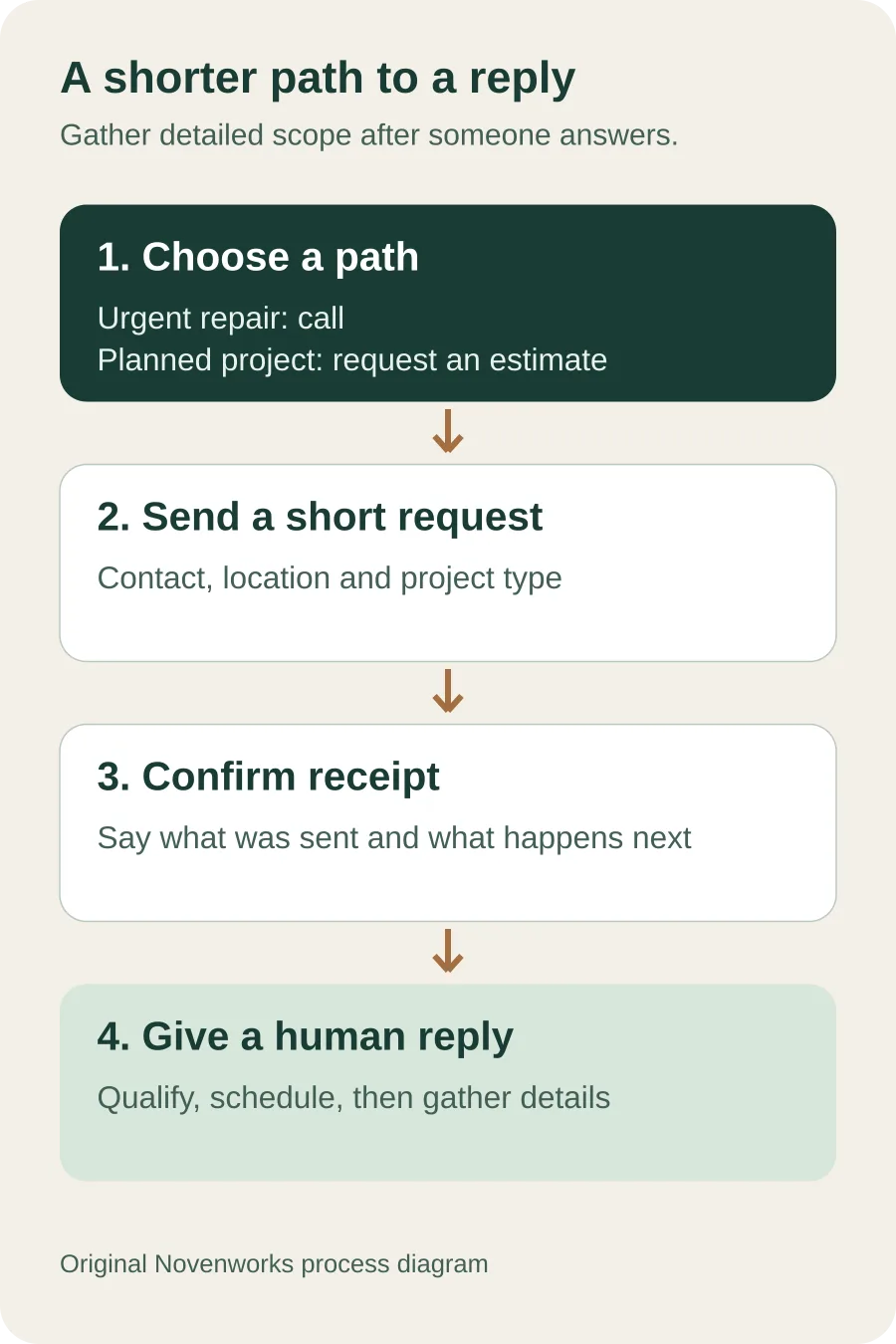
Start with the person who receives the request. Ask what they need to do next: call back, confirm the service area, send a booking link, or schedule an on-site estimate. If the answer is “call back,” the first form does not need to behave like a job intake packet.
| Request | What to ask first | What can wait |
|---|---|---|
| HVAC system not cooling | Name, phone, ZIP or city, short description | Model number, photos, full service history |
| Roof replacement estimate | Name, phone or email, property location, type of work | Roof measurements, materials, financing details |
| Pool or remodel consultation | Contact details, city, broad project type, one open question | Full budget worksheet and design brief |
These are starting points, not a universal field count. A contractor serving a narrow area may need a ZIP code before promising a visit. A company that dispatches emergency work needs a phone number. A designer who prepares a detailed proposal may need a few more facts. Every required field should have a reason the customer would understand.
A repair call and a planned project
A homeowner with water coming through the ceiling should see a call option before an estimate questionnaire. Another homeowner planning a bathroom remodel can describe the project and accept a response the next business day. Sending both to the same long form makes the urgent visitor wait and the planning visitor answer irrelevant questions.
The HVAC website guide shows the same split between urgent repair and planned replacement at page level. The form should preserve that distinction rather than collapse the paths at the last step.
Make the phone experience usable
Open the form on an actual phone. Try it with one hand, while the keyboard covers half the screen. Can you see the field label after entering text? Is the submit button reachable? Does an error tell you which field needs attention without erasing what you already typed?
Use a visible label for every field. A placeholder disappears once a customer starts typing and is a poor substitute for a label; web.dev's form design guidance (opens another website) makes this distinction directly. Use an email input for email and a telephone input for phone: web.dev documents (opens another website) how input types give mobile users a more suitable keyboard. Autocomplete can save repeat typing. None of these details makes a weak offer compelling, but each removes work from a person who has already decided to contact you.
Keep the first screen simple: what the request is for, roughly how long it takes, and what happens after submission. If the form needs several steps, show the steps and preserve answers when someone goes back. Do not ask the same detail twice because two systems happen to be involved.
Is your estimate form losing requests?
Choose a free Website Health Snapshot. We'll try the quote path on a phone and show you where a customer gets stuck and what we'd fix first.
Get a free assessmentPut the promise next to the button
“Submit” tells the customer nothing. “Request an estimate” is clearer, but the sentence beside it matters more: “We’ll review your request and contact you to arrange the next step.” If someone only answers during business hours, say that. Do not promise a same-day reply unless the team can deliver one.
After submission, show a real confirmation that describes what was received and when to expect contact. An email copy can help, but it does not replace an on-screen result. If submission fails, say so and give a working phone alternative. A silent spinner or a success message after a failed save creates a missed job and a customer who thinks you ignored them.
In our Prime Auto Detailing demo build, quote, text and call are separate persistent actions on mobile. It is a demonstration of routing choices, not a client outcome or evidence that any particular form increased inquiries. The useful lesson is the distinction: an owner can make the immediate action obvious without making every visitor complete the same questionnaire.
Test the full request, not only the form screen
Send a test inquiry from a phone with a unique email address. Follow it into the inbox or CRM used by the person responding. Check that the message includes the service, location and contact details, that any notification reaches the right person, and that the reply can be sent from the tool your staff actually use.
Then repeat with an empty required field, a mistyped email, and a slow connection. Ask someone outside the business to describe what they think happens next. A form is not working merely because a green success message appears on your own laptop.
Measure requests submitted and the source page, then compare those with requests the team actually received. A phone-button tap is useful intent, but it is not proof a call connected. The website analytics guide explains these limits and the lead follow-up guide covers the handoff after a request arrives.
When a repair is enough
A broken mobile layout, unclear labels, unnecessary required fields or a failed notification often fit a focused Website Fix Sprint. A full redesign becomes more plausible if every service page sends customers into the wrong flow, the platform cannot support the needed routing, or the site cannot explain the business before the form.
First pass on your own site
- Submit one request on a phone using mobile data.
- Remove every required field that the team does not need for the first response.
- Give urgent customers a clear call path and planned projects a clear estimate path.
- Confirm the request reaches the person who will answer it.
- Read the confirmation and error states as if you were a new customer.
If the path fails, note the exact page, phone size and step. That gives you a smaller and more useful repair brief than “the website needs to convert better.”