A guest discovers a head spa treatment on Instagram, reads the service page, and taps “Book.” Another guest asks whether the treatment suits them and submits a question instead. Both are interested, but they enter different systems. If the website, calendar and staff inbox do not agree on who owns each next step, one guest gets duplicate messages while the other gets no answer.
This guide is for salon, spa, esthetics and wellness owners who already have a booking tool but still handle questions, campaigns and follow-up by hand. The first job is to map the journey you have. A new CRM or automation subscription comes later, if the map shows a real gap it can solve.
Draw the two paths separately
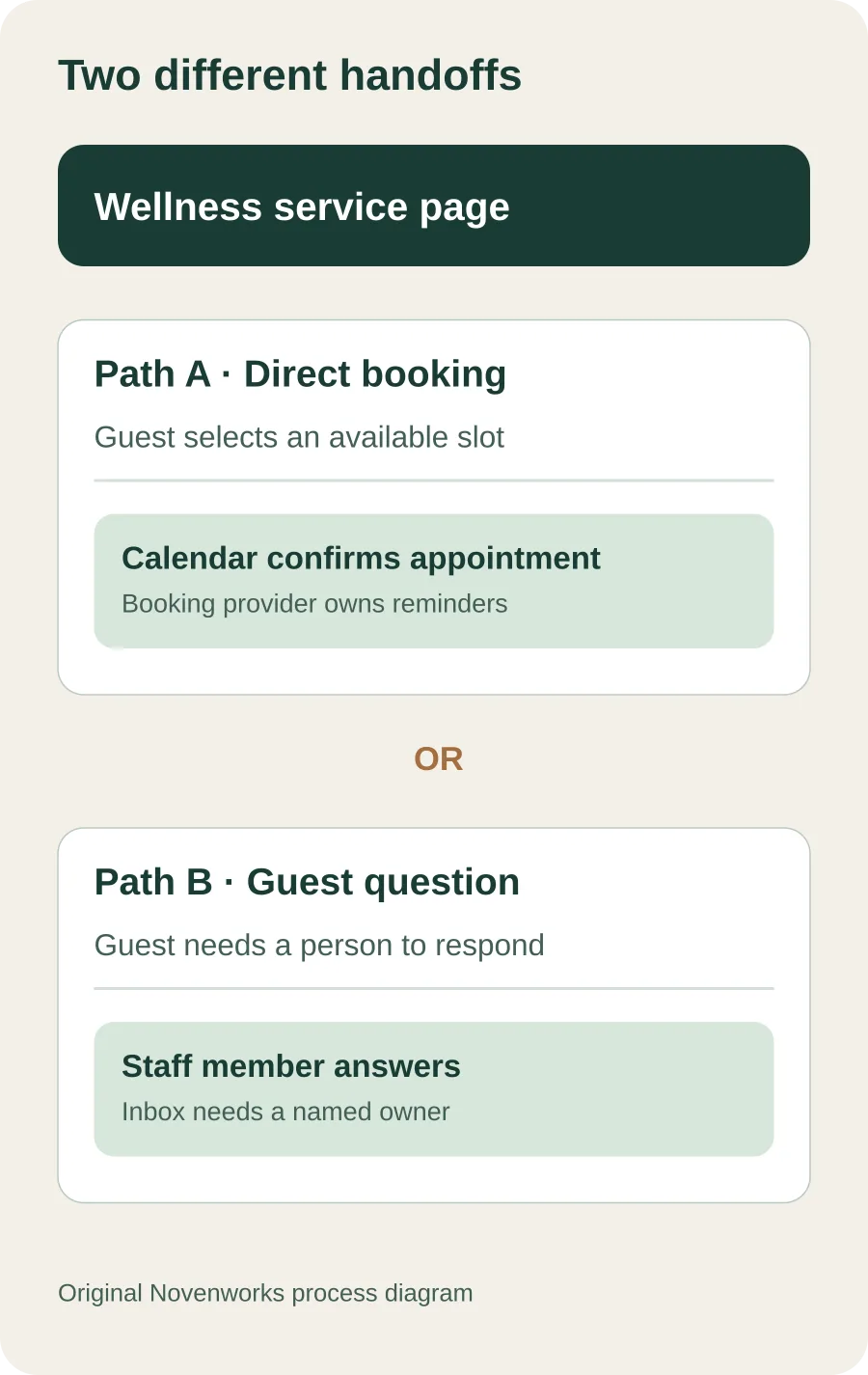
Direct booking and an inquiry are different states. A booking is an appointment recorded by the scheduling system. An inquiry is a question or request that someone still needs to answer. A click on a booking button is neither one by itself.
| Visitor action | Where it should land | What the guest should see | Who owns the next step |
|---|---|---|---|
| Books an available treatment | Booking calendar | Appointment confirmation and relevant preparation details | Calendar owner and treating team |
| Asks whether a treatment is right for them | Monitored inbox or lead queue | Receipt and a truthful response window | Front desk or named specialist |
| Joins a waitlist | Waitlist in the booking system, if offered | Clear explanation that a place is not booked | Person who monitors openings |
| Taps “Book” but leaves the booking service | Usually only a website click, unless configured otherwise | No false booking confirmation | Owner reviewing analytics and the booking provider's reports |
Avoid sending a guest through a general contact form when the only next step is to open the same booking calendar. Also avoid showing a calendar for a service that requires a conversation before a slot can be confirmed. The service page should make the distinction before the visitor has to guess.
Check where the data stops
Open a service page, tap its booking button, complete a test appointment if the system permits it safely, and look at what each tool recorded. The website may know that someone clicked an outbound link but not whether they selected a time. Google Analytics documents outbound-click measurement (opens another website), while the booking platform may hold the completed appointment. Do not call the click a booking in a report.
Platform features differ and change. As one current example, Fresha documents a Google Analytics integration for booking-flow events (opens another website) and booking-channel reporting inside Fresha (opens another website). An integration being available does not mean it is enabled or correctly configured for a particular studio. Verify the account settings and a real test journey before relying on the data.
Our Citrus & Sage Wellness client work illustrates the trade-off. The studio kept a direct link to Fresha for its Day Pass after switching off an on-site lead form. A visitor from an ad no longer had to complete a second form on that page. The website's own lead record and view of completed bookings also disappeared from that path; the booking tool remained the place to inspect appointments. We do not publish booking totals or claim the change increased conversions. This is a decision about friction and visibility, not a universal recommendation to remove forms.
Where does a new guest's request go?
Choose a free Booking Experience Review. We'll trace the public path from service page to booking or inquiry and identify the next practical fix.
Get a free assessmentGive every message a job
Write down each automatic and manual message a new guest might receive: form acknowledgment, booking confirmation, reminder, preparation instructions, reschedule notice, post-visit follow-up and review request. Put them in time order. If the booking provider sends the confirmation, your website should not send a second message implying the appointment is booked before the provider confirms it.
Fresha, for example, documents automated appointment updates (opens another website) and the role of accurate contact details and notification settings. If your studio uses another provider, check its current help documentation and settings rather than assuming it behaves the same way.
Keep inquiries separate from appointment messages. A guest who asked about contraindications or pricing needs a human answer from someone qualified to speak for the business. The site can confirm receipt and set expectations; it should not invent a clinical answer or promise a slot that staff have not checked. If the same inquiry arrives through a website form and a social message, the team needs a way to recognize it as one conversation.
Choose the smallest useful connection
There are several levels of connection. Start with the one that solves the observed problem.
- Clear handoff: the website links directly to the right service in the booking tool, and forms reach a monitored inbox. This may be enough for a small studio.
- Shared routine: staff check one queue at set times and mark who answered each inquiry. The process matters more than buying software.
- Configured reporting: the website and booking platform use supported analytics settings, with test bookings to confirm what the reports mean.
- Integration or automation: only when repeated manual copying is causing missed or inconsistent follow-up. Define the trigger, consent, owner and failure alert before connecting systems.
An automation that sends a beautiful message to the wrong guest is worse than a short, reliable manual process. Decide which system owns the appointment, which owns marketing permission and which stores notes staff need during the visit. Check the privacy terms of any tool receiving customer details, and keep access limited to the staff who need it.
Run a weekly handoff check
Ask one person to trace a direct booking and an inquiry each week. Confirm the links still open the intended service, the calendar shows real availability, the form reaches the right inbox, and the guest receives the expected response. If an offer or treatment name changes, update both the website and booking system together.
Map one guest journey
- Name every place a new guest can click “Book” or “Ask a question.”
- Record where each action lands and what it means: click, inquiry or confirmed appointment.
- Identify the person or system responsible for the next response.
- Read every confirmation and reminder in the order a guest receives them.
- Compare website click reports with the booking system's appointment report without treating them as the same number.
- Test what happens when the calendar has no availability or a form fails.
If the public path is confusing, a Website Fix Sprint may be enough to repair service pages and links. If the bottleneck is the handoff between tools and staff, ongoing growth and operations support is the more relevant conversation. The lead follow-up guide covers the response routine after an inquiry arrives; the analytics guide helps keep clicks, inquiries and bookings distinct.